DOC 05WORKSPACES AND INTEGRATION
Hardware, HIL and external interfaces
The Hardware workspace is an electronics bench for a marine vehicle. You wire a harness, check it, generate firmware, and run the compiled firmware on an emulated microcontroller whose sensors are driven by the simulation. Interface panels connect LEVIATHAN to ArduSub and ROS 2.
| Feature | Kind | Needs |
|---|---|---|
| Harness wiring, checks, firmware project generation | Design tool | Nothing external; compiling needs PlatformIO |
| Run: RP2040 firmware against simulated sensors | Emulation. Your firmware binary runs on an emulated RP2040; modelled sensors answer it | A compiled .uf2 |
| ArduSub SITL backend | Software-in-the-loop. LEVIATHAN is the physics for an ArduSub SITL instance | An ArduSub SITL build (not bundled) |
| MAVLink ground-station link | Interface to an autopilot: arm, mode, manual control, telemetry | A MAVLink endpoint, such as SITL |
| ROS 2 bridge | Interface. Publishes state and sensors, subscribes to thrust commands | A ROS 2 installation |
| Remote device gateway | Interface. A device on the network publishes its data through LEVIATHAN to viewers in the application | A device or companion computer running a gateway client |
| Real vehicle hardware | Not driven directly. Real autopilots and companion computers connect through the interfaces above | — |
The harness bench
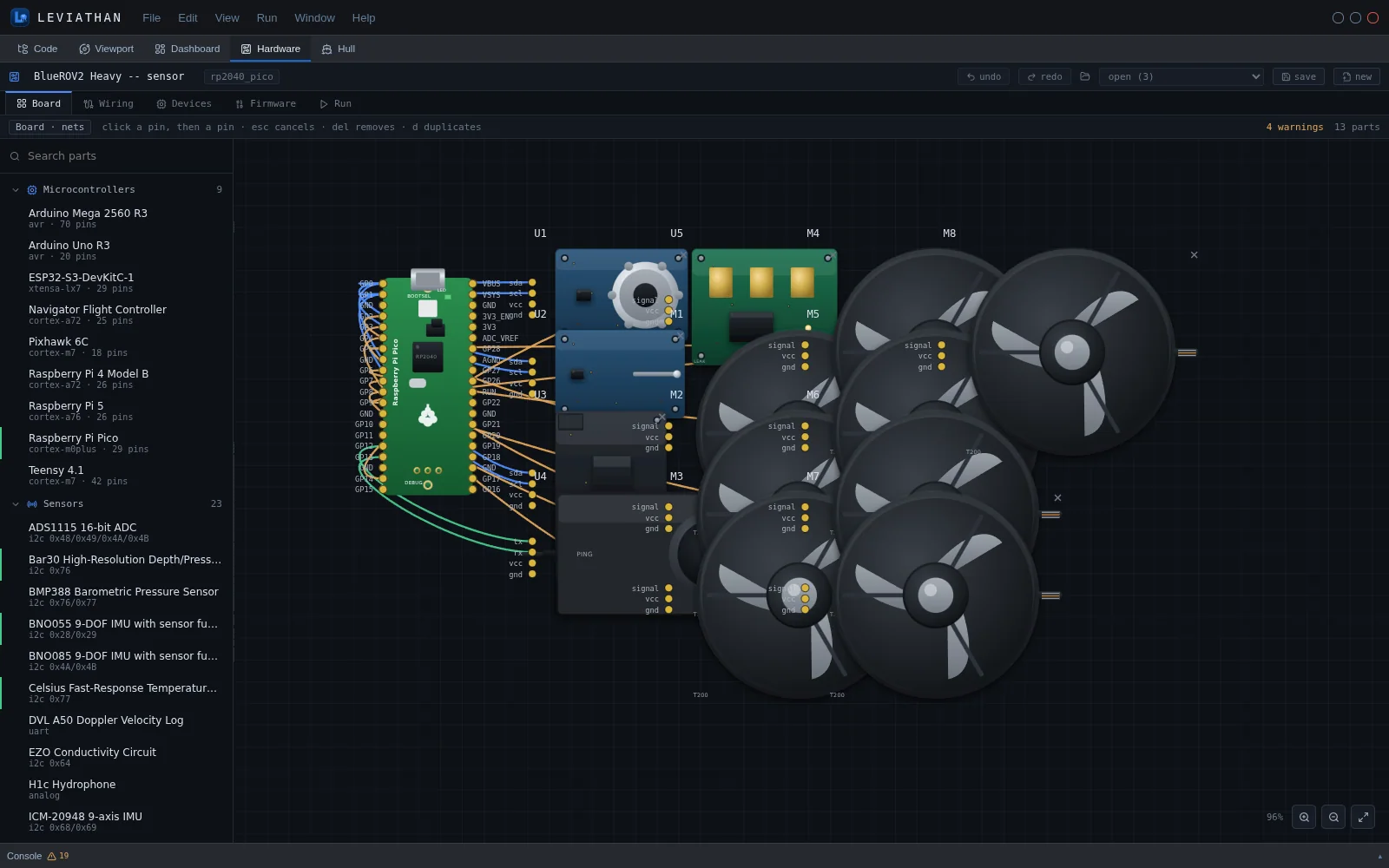
A harness is a board plus parts and the nets between their pins. Click a pin, then another, to wire them. Delete removes a wire, D duplicates a part, and Escape cancels. Harnesses are saved and can be reopened.
| Category | Count | Parts |
|---|---|---|
| Microcontrollers and computers | 9 | Arduino Mega 2560 R3, Arduino Uno R3, ESP32-S3-DevKitC-1, Navigator Flight Controller, Pixhawk 6C, Raspberry Pi 4 Model B, Raspberry Pi 5, Raspberry Pi Pico, Teensy 4.1 |
| Sensors | 23 | ADS1115 ADC, Bar30 depth/pressure, BMP388 barometer, BNO055 and BNO085 IMUs, Celsius temperature, DVL A50, EZO conductivity, H1c hydrophone, ICM-20948 IMU, INA219 power monitor, low-light USB camera, MMC5983MA magnetometer, MPU-6050 IMU, MS5837-02BA depth, NEO-M9N GNSS, PCA9685 PWM driver, Ping altimeter/echosounder, Ping360 scanning sonar, Raspberry Pi Camera Module 3, SOS leak sensor, Underwater GPS Locator U1, microSD module |
| Actuators | 3 | T200 thruster with basic ESC, Newton subsea gripper, Lumen subsea light |
| Companion | 2 | Fathom-X tether interface, Jetson Orin Nano |
| Power | 1 | 14.8 V 18 Ah Li-ion battery |
Part entries describe interfaces, pins and bus addresses for wiring purposes. They are not endorsements or performance data.
Wiring and checks
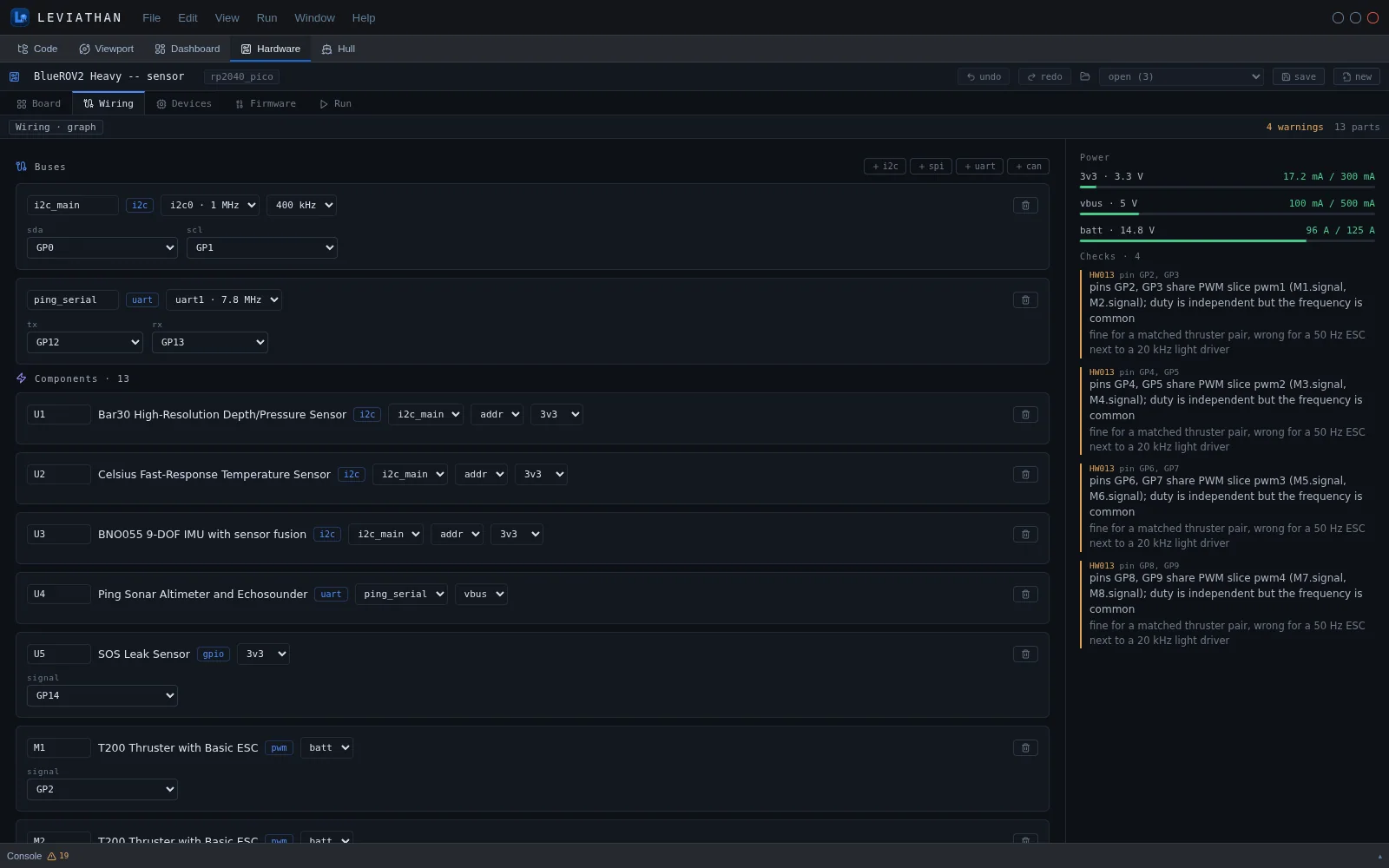
The Wiring tab shows the harness as buses: I²C, SPI, UART and CAN, with their clock and pin assignments. Each component appears with its net and address. Checks run continuously. They cover pins (existence, capability, bus instance, double-booking, boot-strapping pins), buses (I²C address collisions and unsettable addresses, SPI chip-select uniqueness, a bus clock faster than its slowest device), electrical limits (supply range per device, current budget per rail, drive limit per pin) and timers (two PWM outputs forced onto one hardware slice).
Firmware projects
The Firmware tab generates a PlatformIO project from the harness. platformio.ini carries the board, framework and the libraries of every part used, and lev_pins.h carries every pin, bus handle and I²C address. Both are regenerated on each save so they always match the wiring. main.cpp is yours: it is written once and then left alone.
Run: firmware against the simulation
The Run tab loads the .uf2 your compiler produced and runs it on an emulated RP2040 at 125 MHz. The firmware talks to modelled sensors over the buses you wired. Those sensors answer from the vehicle's state, which can come from sliders, a recorded dive, or the firmware itself.
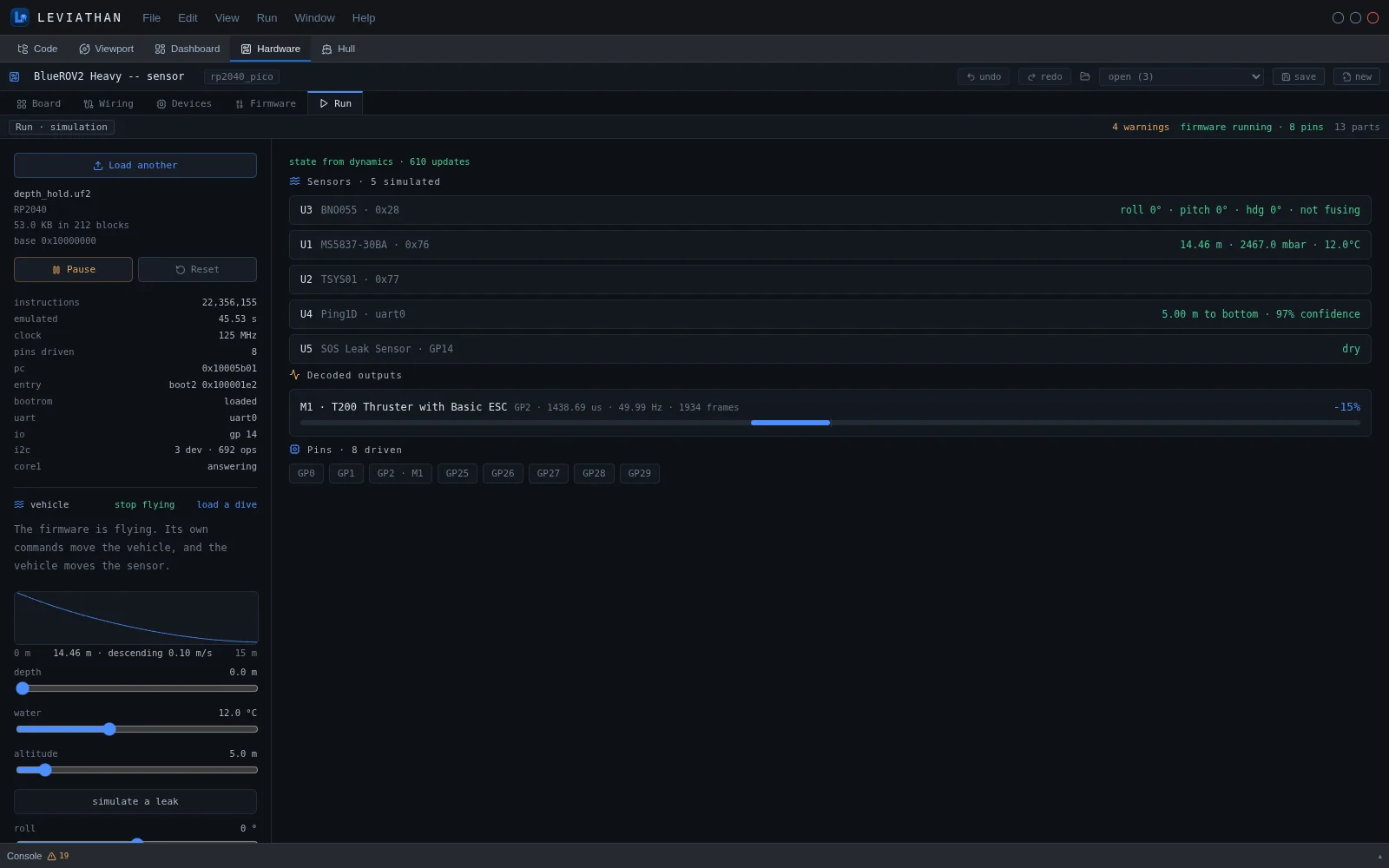
- Vehicle source. Use sliders for depth, water temperature, altitude, roll, pitch and heading, or simulate a leak. Load a dive replays a recorded dive. Fly it closes the loop: the firmware's own thruster commands move the simulated vehicle, and the vehicle moves the sensors.
- Emulator readout. Instructions executed, emulated time, clock, pins driven, program counter, boot stage, UART and I²C traffic.
- Decoded outputs. PWM on output pins is decoded into actuator commands, such as an ESC pulse width as percent thrust, with frequency and frame count.
| Bus | Modelled parts | Driven by |
|---|---|---|
| I²C | Bar30 (MS5837-30BA), MS5837-02BA, Celsius (TSYS01), BNO055, INA219 | Depth, temperature, attitude and rates, bus voltage and current |
| UART | Ping altimeter (Ping1D protocol), Ping360, DVL A50 | Altitude, depth, attitude |
| GPIO | SOS leak sensor | Leak state |
- Parts without a model do not acknowledge on the bus, which firmware reads as absent.
- The emulated ADC is not wired, so analog parts such as the H1c hydrophone and battery monitor do not reach firmware.
- The RP2040's second core is answered so firmware boots, but code on the second core does not run.
- Run emulates the RP2040 only. Other boards in the library are available for wiring and project generation.
External interfaces
ArduSub SITL and MAVLink
LEVIATHAN can act as the physics backend for an ArduPilot SITL instance using ArduPilot's JSON interface. Each frame, SITL sends its servo PWM outputs over UDP, and LEVIATHAN steps the chosen vehicle and replies with the vehicle state. The default vehicle is the BlueROV2 Heavy and the default port is 9002. The Dashboard's SITL / HIL panel starts and stops this backend. It also connects a MAVLink ground-station link to arm and disarm, set the flight mode, send manual control setpoints and read attitude and position telemetry. An ArduSub SITL build is required and is not bundled.
ROS 2
The ROS 2 bridge publishes vehicle state and sensors and subscribes to thrust commands, under the namespace leviathan. The Dashboard's ROS 2 panel shows the topic contract and runs a preview of the messages without ROS. Running the live node needs a ROS 2 installation.
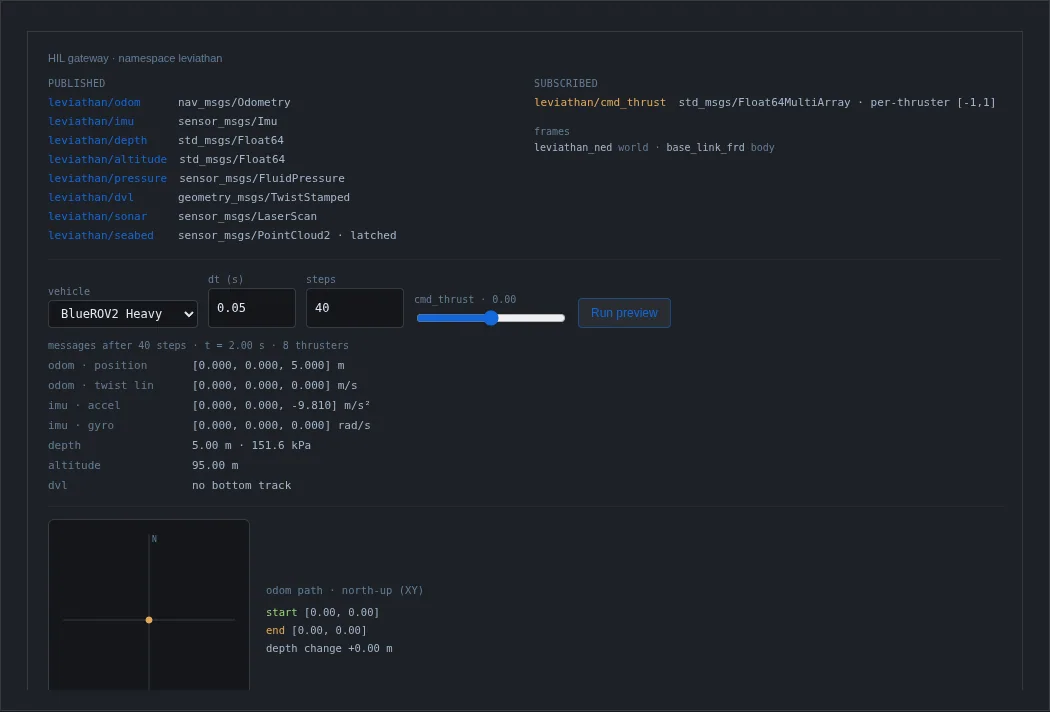
| Topic | Type | Direction |
|---|---|---|
| leviathan/odom | nav_msgs/Odometry | Published |
| leviathan/imu | sensor_msgs/Imu | Published |
| leviathan/depth | std_msgs/Float64 | Published |
| leviathan/altitude | std_msgs/Float64 | Published |
| leviathan/pressure | sensor_msgs/FluidPressure | Published |
| leviathan/dvl | geometry_msgs/TwistStamped | Published |
| leviathan/sonar | sensor_msgs/LaserScan | Published |
| leviathan/seabed | sensor_msgs/PointCloud2 (latched) | Published |
| leviathan/cmd_thrust | std_msgs/Float64MultiArray, per thruster in [−1, 1] | Subscribed |
Frames are leviathan_ned for the world and base_link_frd for the body. The bridge drives the analytic dynamics, not the canonical World.
Replay
The Replay panel ingests a ROS 2 bag, or an odometry, pose or transform log in JSON or JSONL, and plays the trajectory back in the Viewport.
Remote device gateway
A device, such as a vehicle's companion computer, registers with the simulation service and receives an identifier and a token. It then connects over a WebSocket and publishes messages, and LEVIATHAN relays them to every client watching that device. The device is never exposed directly. Registered devices and whether they are online appear in the Dashboard's data-source selector. LEVIATHAN carries the messages; their content is defined by the device.
Other interfaces
- OpenUSD. Scenes and Worlds can be exported as OpenUSD, and OpenUSD scenes can be loaded into the Viewport.
- LCM. A channel contract and a publisher for Lightweight Communications and Marshalling exist as a library-level adapter for integrators. The application has no control for it.
Software support versus robot designs
Everything on this page is LEVIATHAN software that works with hardware: design tools, emulation and interfaces. Separately, Azarel develops physical robot designs alongside LEVIATHAN, such as the HC-1 hull crawler and NC-1 niche cleaner modelled in the Hull workspace. Those are concept designs that have not been built or tested. They are not hardware supplied with LEVIATHAN.